Following bellow is build Xen Host on top Ubuntu 9.10 Server.It is based on direct clone via “hg” and build Xen 3.4.3-rc4 from xensource.com , applying Andrew Lyon’s 2.6.31 patch set V12 to vanilla kernel 2.6.31.12 along with tuning patched kernel via “make menuconfig” and building aka Suse xenified kernel in Ubuntu 9.10 environment.Notice that forward porting of original patch set was done by Jan Beulich for 2.6.31.8 kernel on OpenSuse 11.2. Built in patched kernel open-source NVIDIA and Radeon HD drivers work just fine on Ubuntu 9.10, providing Gnome Desktop Environment right away.
# cd /usr/src/build/

# wget http://gentoo-xen-kernel.googlecode.com/files/xen-patches-2.6.31-12.tar.bz2
4.Untar linux-2.6.31.8.tar.bz2 and apply patches.
# cd /usr/src/build/

# bzcat linux-2.6.31.8.tar.bz2 | tar xf -

# mkdir -p xen-patches-2.6.31-12

# cd  xen-patches-2.6.31-12

# bzcat ../xen-patches-2.6.31-12.tar.bz2 | tar xf -

# cd ../linux-2.6.31.8
Run script
#!/bin/bash

for P in `ls ../xen-patches-2.6.31-12/6*.patch1 | sort `

do

 patch -p1 -s -i $P

if [ $? = 0 ]; then

 echo $P applied

else

 echo "Error processing "$P

 exit 1

fi

done
Build kernel :-
# make menuconfig


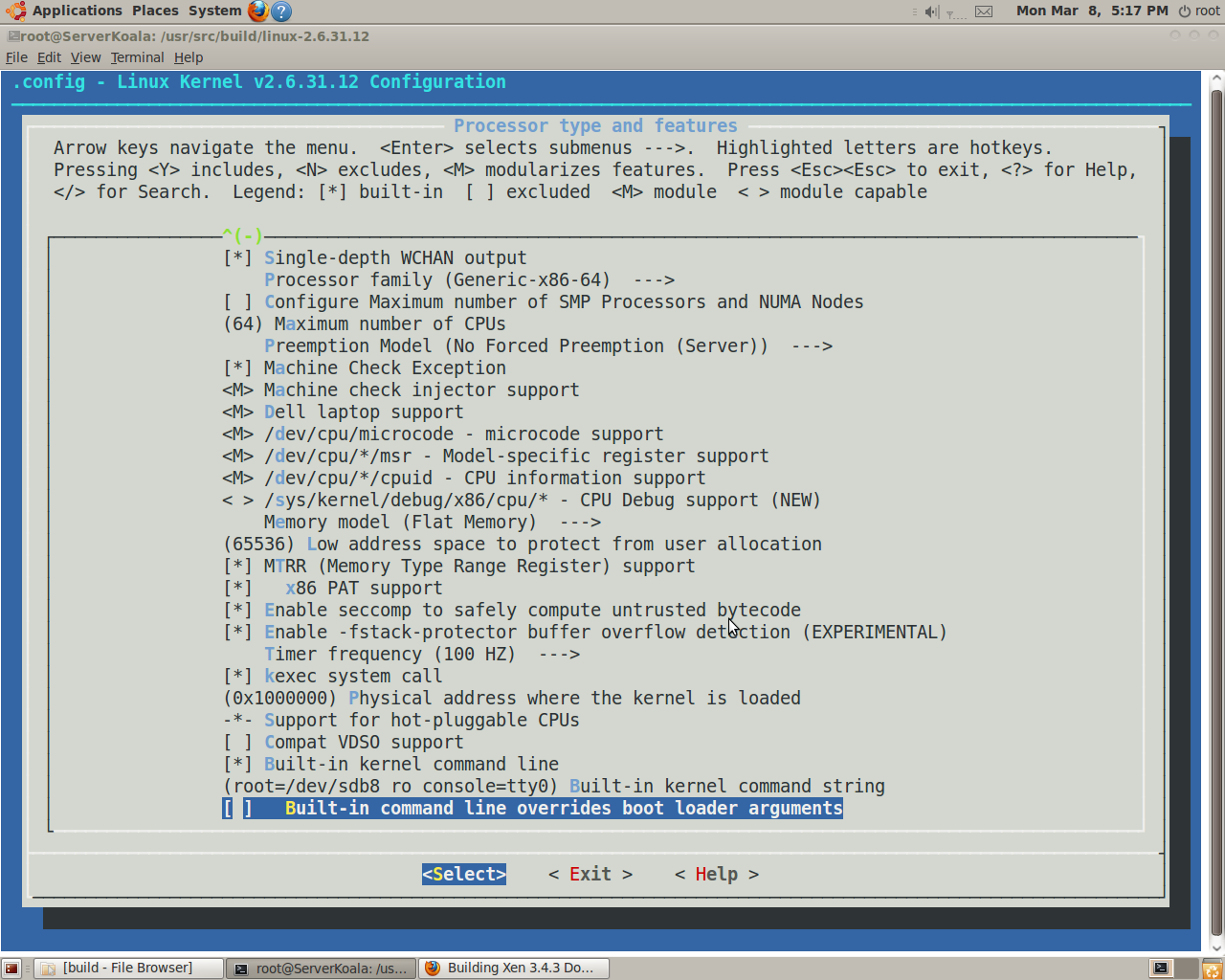
Processor type and features ->

  [*] Symmetric multi-processing support

       [ ] Support sparse irq numbering

       [*] Enable MPS table

       [*] Enable Xen compatible kernel

       [*] Single-depth WCHAN output

           Processor family (Generic-x86-64)  --->

       [ ] Configure Maximum number of SMP Processors and NUMA Nodes

       (64) Maximum number of CPUs

       Preemption Model (No Forced Preemption (Server))  --->

       [ ] Machine Check Exception


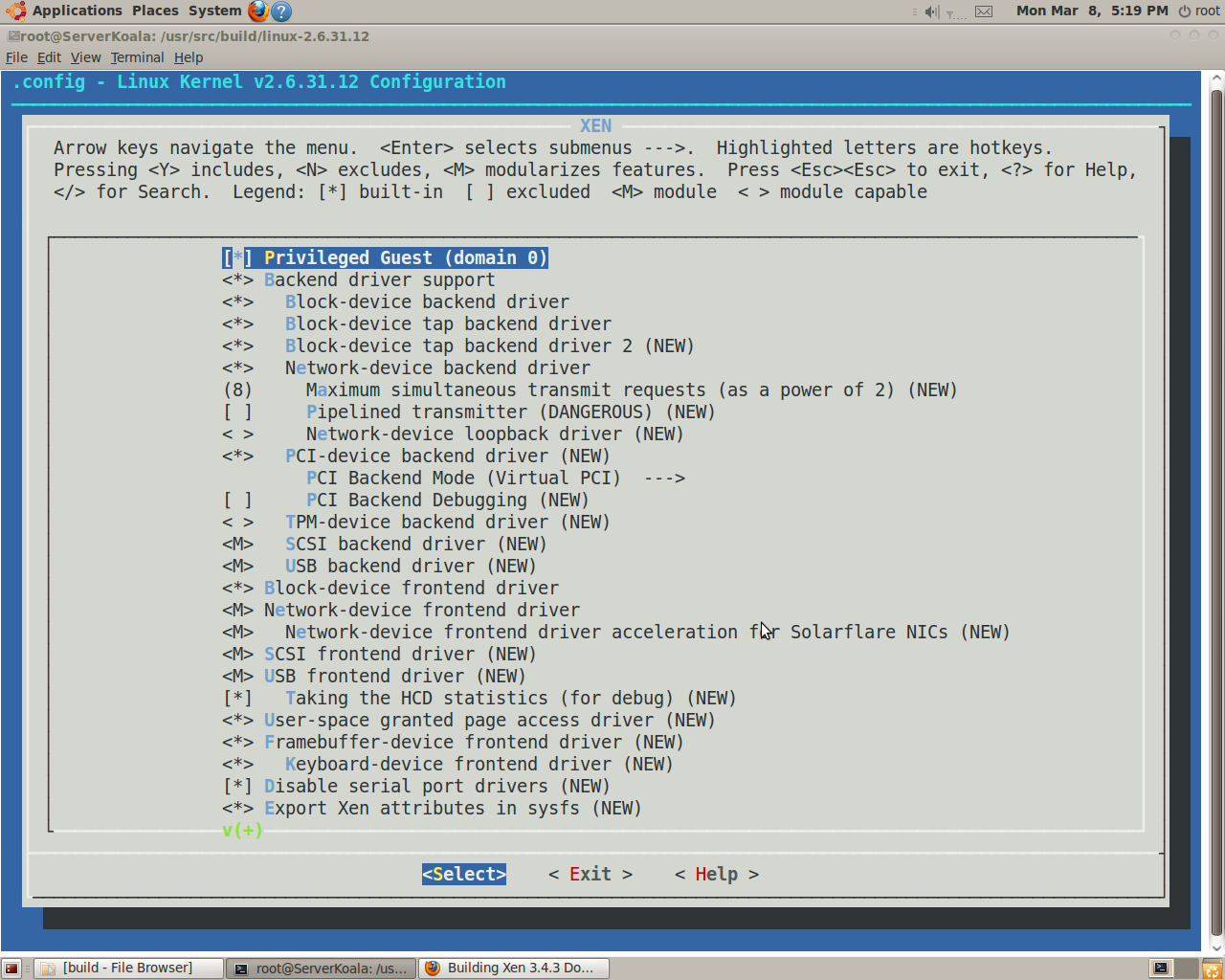
Device Drivers -> XEN

   [*] Privileged Guest (domain 0)

        <*> Backend driver support

        <*>   Block-device backend driver

        <*>   Block-device tap backend driver

        <*>   Block-device tap backend driver 2

        >*>   Network-device backend driver

        (8)     Maximum simultaneous transmit requests (as a power of 2)

        [ ]     Pipelined transmitter (DANGEROUS)

        < >     Network-device loopback driver

        <*>   PCI-device backend driver

              PCI Backend Mode (Virtual PCI)  --->

        [ ]     PCI Backend Debugging

        < >   TPM-device backend driver

        <M>   SCSI backend driver

        <M>   USB backend driver

        <M> Block-device frontend driver

        <M> Network-device frontend driver

        <M>   Network-device frontend driver acceleration for Solarflare NICs

        <M> SCSI frontend driver

        <M> USB frontend driver

        [*]   Taking the HCD statistics (for debug)

        <*> User-space granted page access driver

        <*> Framebuffer-device frontend driver


# make -j(x)(number_of_cores)

# make modules_install install

# mkinitramfs -o /boot/initrd-2.6.31.12.img  2.6.31.12
Different option is to install pvops enabled kernel 2.6.32.9 via download :-
# git clone git://git.kernel.org/pub/scm/linux/kernel/git/jeremy/xen.git linux-2.6-xen

# cd linux-2.6-xen

# git checkout origin/xen/stable -b xen/stable
Notice :-
# git checkout origin/xen/master -b xen/master
will result building the most recent 2.31.6 version of pvops kernel. Branch
above , actually is not required to be checked out . It’s default branch of
“git clone”. Difference in meantime is in “acpi” branch not merged yet to xen/stable. However, APIC rework has been committed for 2.6.32.9.
# make menuconfig

# make

# make modules_install install

# mkinitramfs -o /boot/initrd-2.6.32.9.img 2.6.32.9
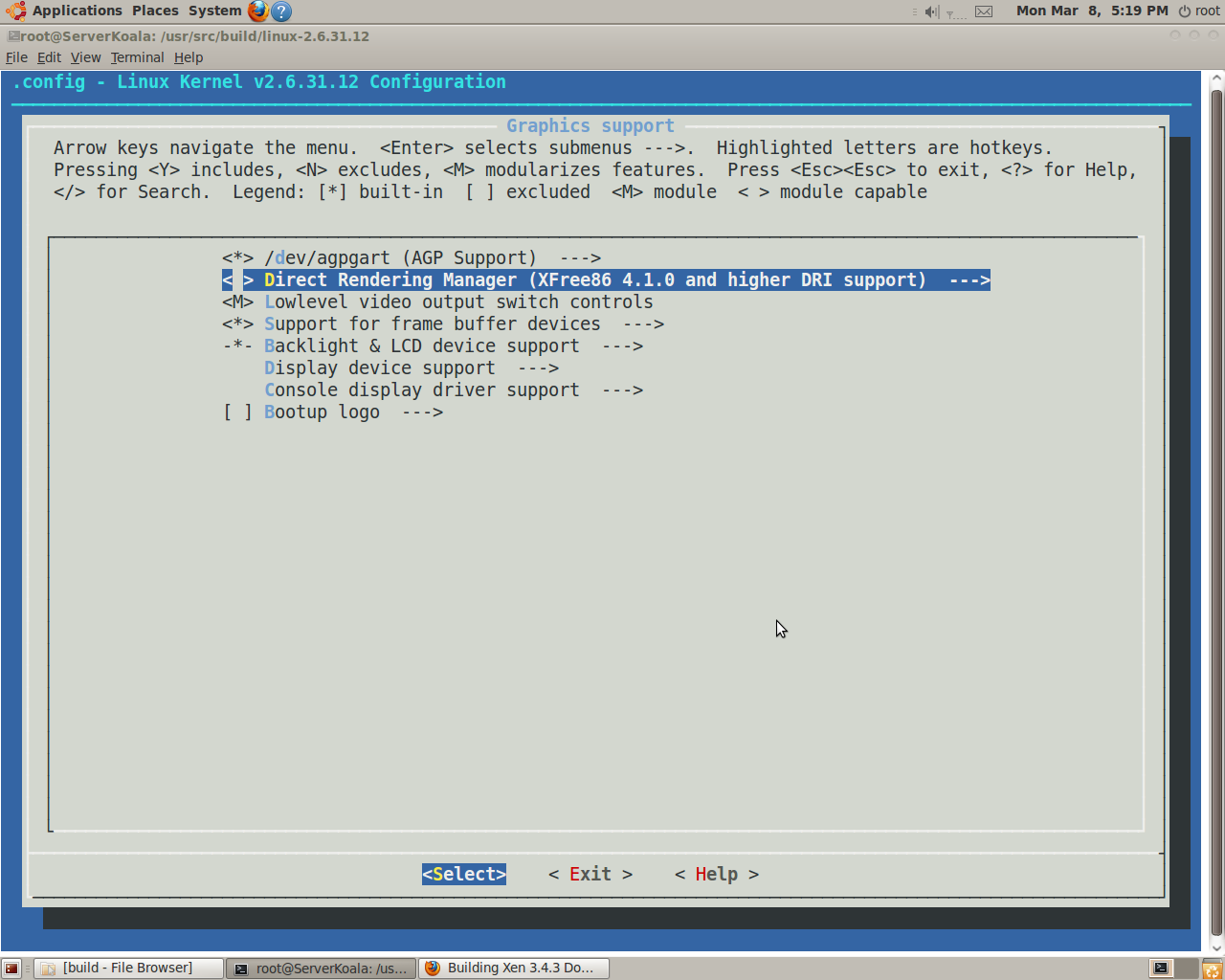
To test 2.6.31.12 xenified aka Suse kernel setup Xen 3.4.3 on to top of Ubuntu Karmic Server. First – install on Ubuntu Karmic Server all packages required for Xen build along with Ubuntu-Desktop ( via tasksel). Of course, Xen Host doesn’t require GUI. Install Ubuntu-Desktop just make work comfortable and faster.
apt-get install libcurl4-openssl-dev \

xserver-xorg-dev \

python2.6-dev \

mercurial gitk \

build-essential \

libncurses5-dev \

uuid-dev gawk \

gettext texinfo bcc
Second – build Xen from source
# cd /usr/src

# hg clone http://xenbits.xensource.com/xen-3.4-testing.hg

# cd xen-3.4-testing.hg

Set in Config.mk

PYTHON = python

PYTHON_PREFIX_ARG =

# make install-xen

# make install-tools

# make install-stubdom
Tuning Config.mk results Xen packages to be placed into /usr/local/lib/python2.6/dist-packages due to Changeset 19594 in xen-3.4-testing.hg. Otherwise, Xen packages would go to /usr/lib/python2.6/site-packages, which is not default location for python 2.6 on Ubuntu 9.04 ( vs F11 ). Thus you won’t be able to start xend in Dom0. Same thing happens when building Xen Unstable on Ubuntu 9.04 Server.
Add entry to /boot/grub/menu.lst:-
title Xen 3.4 / Ubuntu 9.04 kernel 2.6.30.2

uuid 34d2c0bd-fe30-47e0-990e-4921caf1e845

kernel /boot/xen-3.4.gz

module /boot/vmlinuz-2.6.31.12  root=/dev/sdb2 ro console=tty0

module /boot/initrd-2.6.31.12.img
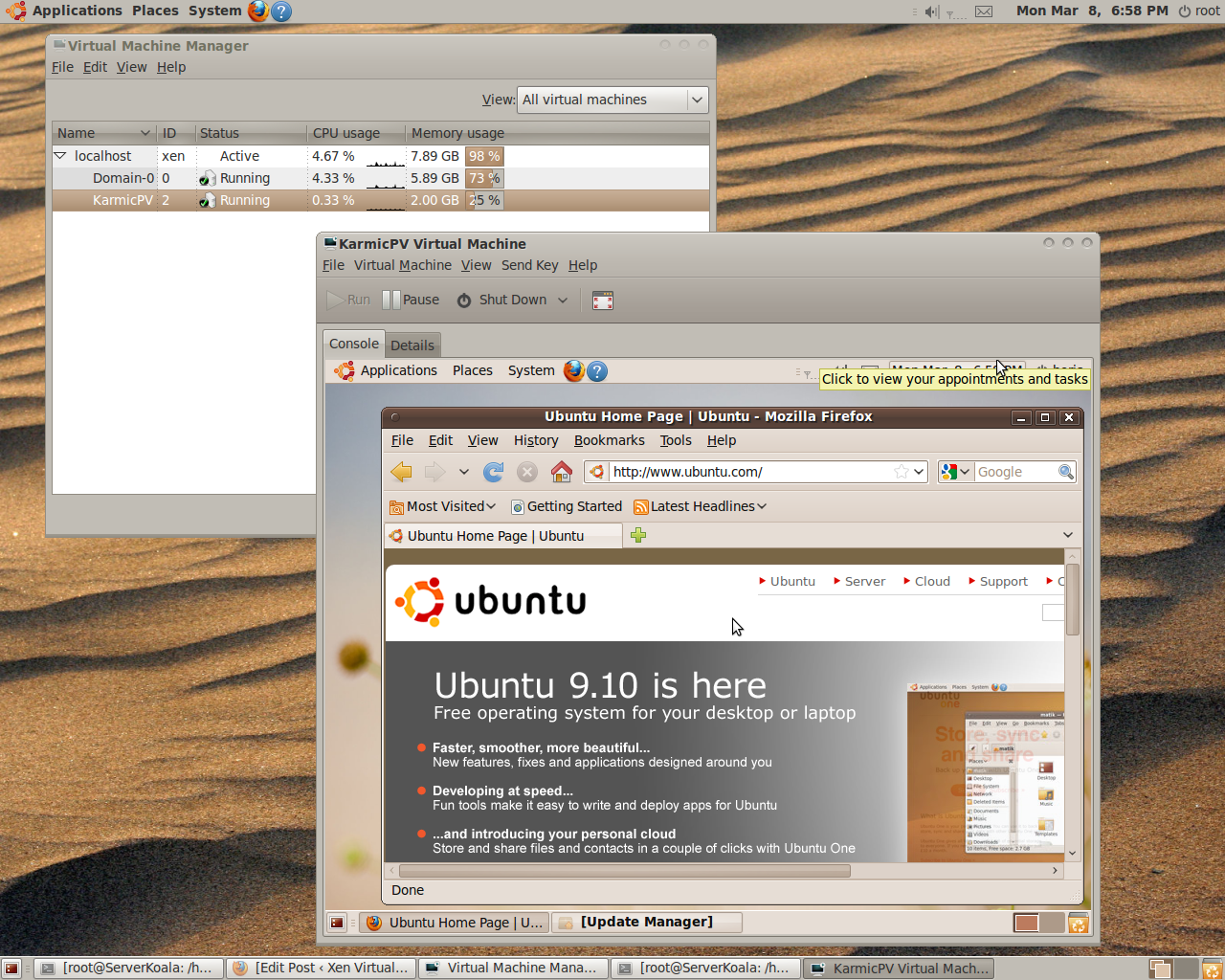
and rebooted into xen host.Tested OSOL 133 PV DomU,F12 PV DomU, Ubuntu Kamic HVM and PV DomUs sharing same image device.
References
1.Gentoo-xen-kernel
2.2.6.31 dom0 Xen patches
- Comment
- Reblog
-
Subscribe
Subscribed
Already have a WordPress.com account? Log in now.
 Xen Virtualization on Linux and Solaris
hello
i don’t understand,
the second way don’t produces a linux dom0 2.6.30.1
kernel but this ones :
ls /usr/lib/xen/boot/ -tl
total 3648
-rw-r–r– 1 root root 757380 2009-07-23 20:32 pv-grub-x86_32.gz
-rw-r–r– 1 root root 1869290 2009-07-23 20:31 ioemu-stubdom.gz
-rw-r–r– 1 root root 787028 2009-07-23 20:31 pv-grub-x86_64.gz
-rw-r–r– 1 root root 295416 2009-07-23 20:27 hvmloader
where is my dom0 ?
Linux xenified kernel 2.6.30.1 is located under /boot, after you issued
# make install_modules install
What kind of kernel you expect to find under /usr/lib/xen/boot/ ?
Target folder for :-
# make install-xen
# make install-stubdom
ok ,
i forgot this step …
but what are the files in /usr/lib/xen/boot/ ?
…
i compiled 2.6.30.1 with patches but my computer don’t boot (xen starts, but dom0 is nowhere, no scree, boot loops)
Check your Grub Entry :
title Xen 3.4 / Ubuntu 9.04 kernel 2.6.30.1
# uuid 34d2c0bd-fe30-47e0-990e-4921caf1e845
kernel /boot/xen-3.4.gz
module /boot/vmlinuz-2.6.30.1 root=/dev/sda14 ro console=tty0
module /boot/initrd-2.6.30.1.img
Specially root= ? and presence xenified /boot/vmlinuz-2.6.30.1 and /boot/initrd-2.6.30.1.img
i want to have
xen3.4 stable version (official tarball)
linux kernel 2.6.30 lastest stable (vanilla?)
ubuntu 9.04 server
on
nvidia motherbord amd64 phenom II processor …
> xen3.4 stable version (official tarball)
http://www.xen.org/download/
However, i would recommend wait until 3.4.1 official tarball. It’s up to you.
>linux kernel 2.6.30 lastest stable (vanilla?)
http://www.icewalkers.com/Linux/Software/515380/Linux-Kernel-2.6.html
>ubuntu 9.04 server
http://www.ubuntu.com/getubuntu/download-server
Personally, i don’t like and don’t assemble for myself AMD&NVIDIA Boards based boxes. However,this hardware works for Xen and is very popular.
thank’s a lot ,
my last try was with theses ..
but i am stopping on the resulting dom0 ….
my unique success was with your post “Setup Fedora 11 PV DomU at Xen 3.4.1 Dom0 (kernel 2.6.30-rc6-tip) on top of Fedora 11” applied to Ubuntu
but without tty console, just a gui one.
If you want send me your step by step actions on Ubuntu 9.04 server. E-mail : bderzhavets@yahoo.com
[…] patches set # wget http://gentoo-xen-kernel.googlecode.com/files/xen-patches-2.6.30-3.tar.bz2 followed by building 2.6.30.2 xenified kernel # make menuconfig # make -j(x)(number_of_cores) # make modules_install install # mkinitramfs -o […]
Hi,
when i try this, i get:
LD .tmp_vmlinux1
ld: kernel image bigger than KERNEL_IMAGE_SIZE
ld: kernel image bigger than KERNEL_IMAGE_SIZE
ld: kernel image bigger than KERNEL_IMAGE_SIZE
How can i solve this?
[…] the instructions here to build a xenified kernel (2.6.30.2) (via the first […]
Hi Everybody
I exactly have followed the instructions but I’ve got the following errors:
LD vmlinux.o
MODPOST vmlinux.o
WARNING: modpost: Found 2 section mismatch(es).
To see full details build your kernel with:
‘make CONFIG_DEBUG_SECTION_MISMATCH=y’
GEN .version
CHK include/linux/compile.h
UPD include/linux/compile.h
CC init/version.o
LD init/built-in.o
LD .tmp_vmlinux1
arch/x86/kernel/built-in.o: In function `timer_interrupt’:
/usr/src/build/linux-2.6.30.2/arch/x86/kernel/time_32-xen.c:463:
undefined reference to `__udivdi3′
make: *** [.tmp_vmlinux1] Error 1
Regards
Mehdi
Known bug for 32-bit :-
Hi and thanks for the post, this is great to not having to use an old kernel…
Though I get an error at the end of the kernel build (exactly like SK) :
…
LD .tmp_vmlinux1
ld: kernel image bigger than KERNEL_IMAGE_SIZE
…
(I’ve been trying with linux-2.6.31.12 kernel sources and those patches http://gentoo-xen-kernel.googlecode.com/files/xen-patches-2.6.31-10.tar.bz2)
Please If you have any idea, I’d love to read them.
You may follow :-
http://www.linuxtoday.com/it_management/2010021103035OSHESV
i alway get this error when starting a DomU:
Error: (4, ‘Out of memory’, ‘xc_dom_alloc_segment: segment kernel too large (0x515a > 0xa00 – 0x100 pages)\n’)
Any ideas?
It’s very old post. Try 2.6.31.8(9,..,12) with the most recent Andy’s patchset(link is the same).
The Problem i have at the moment is that im not sure if this a problem form the Dom0 kernel or a problem from the xen hypervisor..
Maybe this is a problem form the hypervisior + python2.6.. but im not sure
The Kernel 2.6.31-11 with the xen patches worked.
[2010-03-05 16:24:51 20266] INFO (SrvDaemon:332) Xend Daemon started
[2010-03-05 16:24:51 20266] INFO (SrvDaemon:336) Xend changeset: unavailable.
[2010-03-05 16:24:52 20266] DEBUG (XendDomainInfo:140) XendDomainInfo.recreate({‘max_vcpu_id’: 1, ‘cpu_time’: 1144688123669L, ‘ssidref’: 0, ‘hvm’: 0, ‘shutdown_reason’: 0, ‘dying’: 0, ‘online_vcpus’: 2, ‘domid’: 0, ‘paused’: 0, ‘crashed’: 0, ‘running’: 1, ‘maxmem_kb’: 17179869180L, ‘shutdown’: 0, ‘mem_kb’: 523008L, ‘handle’: [0, 0, 0, 0, 0, 0, 0, 0, 0, 0, 0, 0, 0, 0, 0, 0], ‘blocked’: 0, ‘name’: ‘Domain-0’})
[2010-03-05 16:24:52 20266] INFO (XendDomainInfo:158) Recreating domain 0, UUID 00000000-0000-0000-0000-000000000000. at /local/domain/0
[2010-03-05 16:24:52 20266] DEBUG (XendDomain:453) Adding Domain: 0
[2010-03-05 16:24:52 20266] DEBUG (XendDomain:387) number of vcpus to use is 0
[2010-03-05 16:24:52 20266] DEBUG (XendDomainInfo:1716) XendDomainInfo.handleShutdownWatch
[2010-03-05 16:24:52 20266] WARNING (XendAPI:701) API call: VBD.set_device not found
[2010-03-05 16:24:52 20266] WARNING (XendAPI:701) API call: VBD.set_type not found
[2010-03-05 16:24:52 20266] WARNING (XendAPI:701) API call: session.get_all_records not found
[2010-03-05 16:24:52 20266] WARNING (XendAPI:701) API call: event.get_record not found
[2010-03-05 16:24:52 20266] WARNING (XendAPI:701) API call: event.get_all not found
[2010-03-05 16:24:52 20266] WARNING (XendAPI:701) API call: VIF.get_network not found
[2010-03-05 16:24:52 20266] WARNING (XendAPI:701) API call: VIF.set_device not found
[2010-03-05 16:24:53 20266] WARNING (XendAPI:701) API call: VIF.set_MAC not found
[2010-03-05 16:24:53 20266] WARNING (XendAPI:701) API call: VIF.set_MTU not found
[2010-03-05 16:24:53 20266] WARNING (XendAPI:701) API call: debug.get_all not found
If you can load Dom0 you can
# dmesg > dmesg.log
and submit it to xen-devel.
Another option write to my e-mail step-by-step procedure :-
1.How installed Xen Hypervisor on Ubuntu 9.04 (9.10) server ? Have you modified Config.mk as required ?
2.How patched and built the kernel ? .11 is for sure bad
number for 10th patch. 2.6.31.8.(9,12) have been tested OK
under Xen 4.0-rc4, 3.4.3-rc3 on top of Karmic Server.
thx 4 help.
first ill try it with ubuntu 9.04 now i think that is/was the main problem that i though it could be running with ubuntu server 9.10
Nop, 9.04 Server works fine. You can upgrade to 9.10 it’s
not important , unless additional GRUB 2 pain
yeah your right 🙂 Now it works
With the kernel 2.6.30-8 and the patch -9
But after the 6th recompile 😀
Thx
> With the kernel 2.6.30-8 and the patch -9
Kernel 2.6.31.8 patch 12.
All posting has been rewritten today to be up to date. 2.6.31.8-xen is OpenSuse 11.2 xenified
kernel done by Jan Beulich
For Syl and SK, I got this error as well:
ld: kernel image bigger than KERNEL_IMAGE_SIZE
It went away when I removed compatibility code for older versions of Xen (under menuconfig –> Device Drivers –> XEN –> Xen version compatibility). At least, that’s what I think did it.
I simply have got a chance to this amazing web-webpage not
long ago. I had been actually grabbed with all the bit
of sources you’ve got right the following. Big thumbs upward in making this kind of great wewebsite page!
Hi mates, how is the whole thing, and what you
want to say regarding this article, in my view its in fact remarkable for me.